EFFICIENT TRAINING. BETTER RESULTS

Instructor & School Tools

My Flight Academy is developing tools to help instructors and schools support students, track progress, organize training and keep communication connected throughout the learning process.

Instructor access is available after VFR Course enrollment and certificate review. Schools can contact us directly to set up team access.

Course Materials Access

Student Progress Tracking

Connect with Students & Team

Syllabus Creator Tool

COMING SOON

INSTRUCTOR & SCHOOL FEATURES

Better Support Through Connected Tools

My Flight Academy brings course access, progress tracking, communication and future syllabus tools into one connected training environment, so instructors and schools can support students more clearly and efficiently.

My Flight Academy was built to give student pilots a clear, structured path from study to application.

Student Monitoring

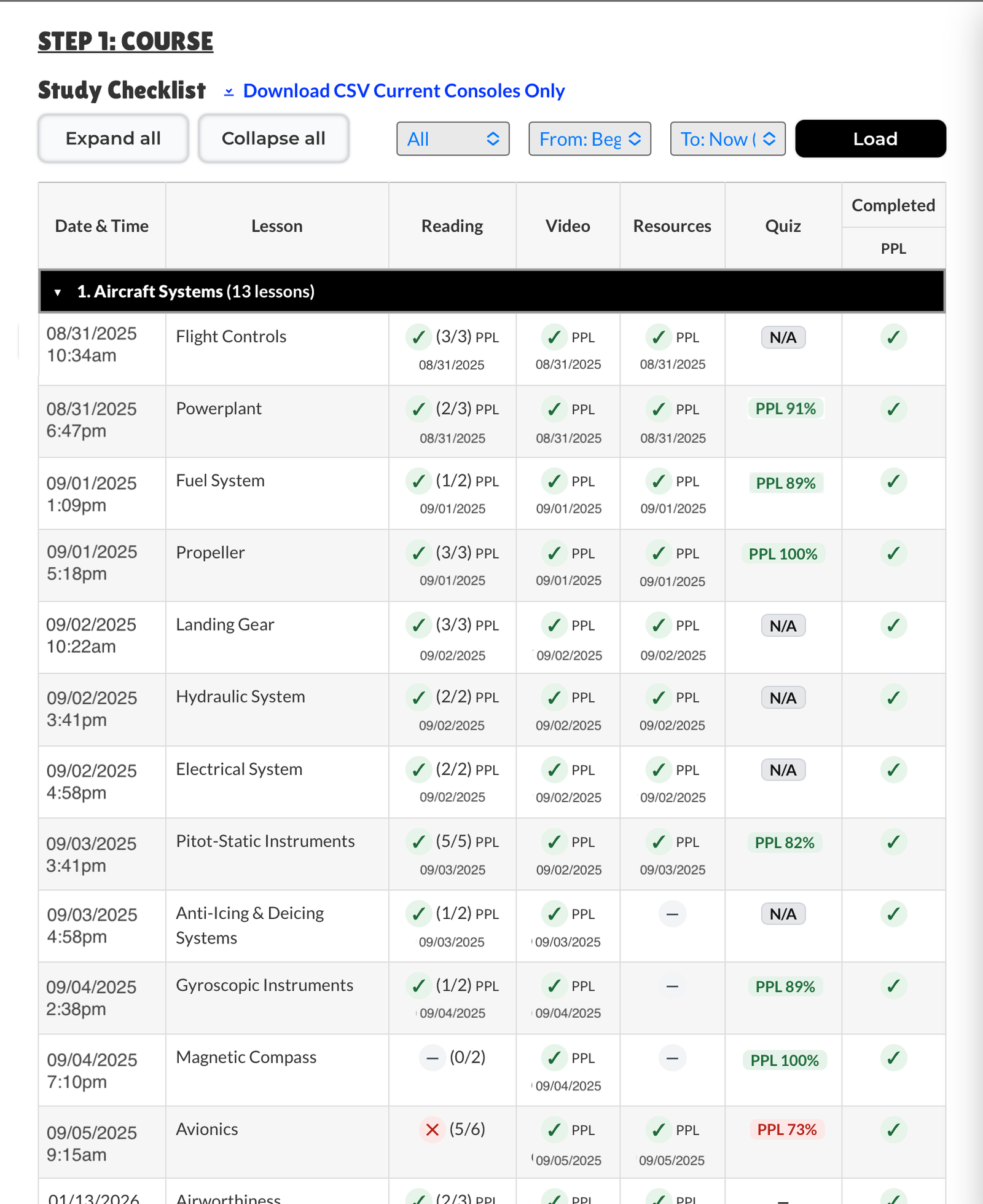
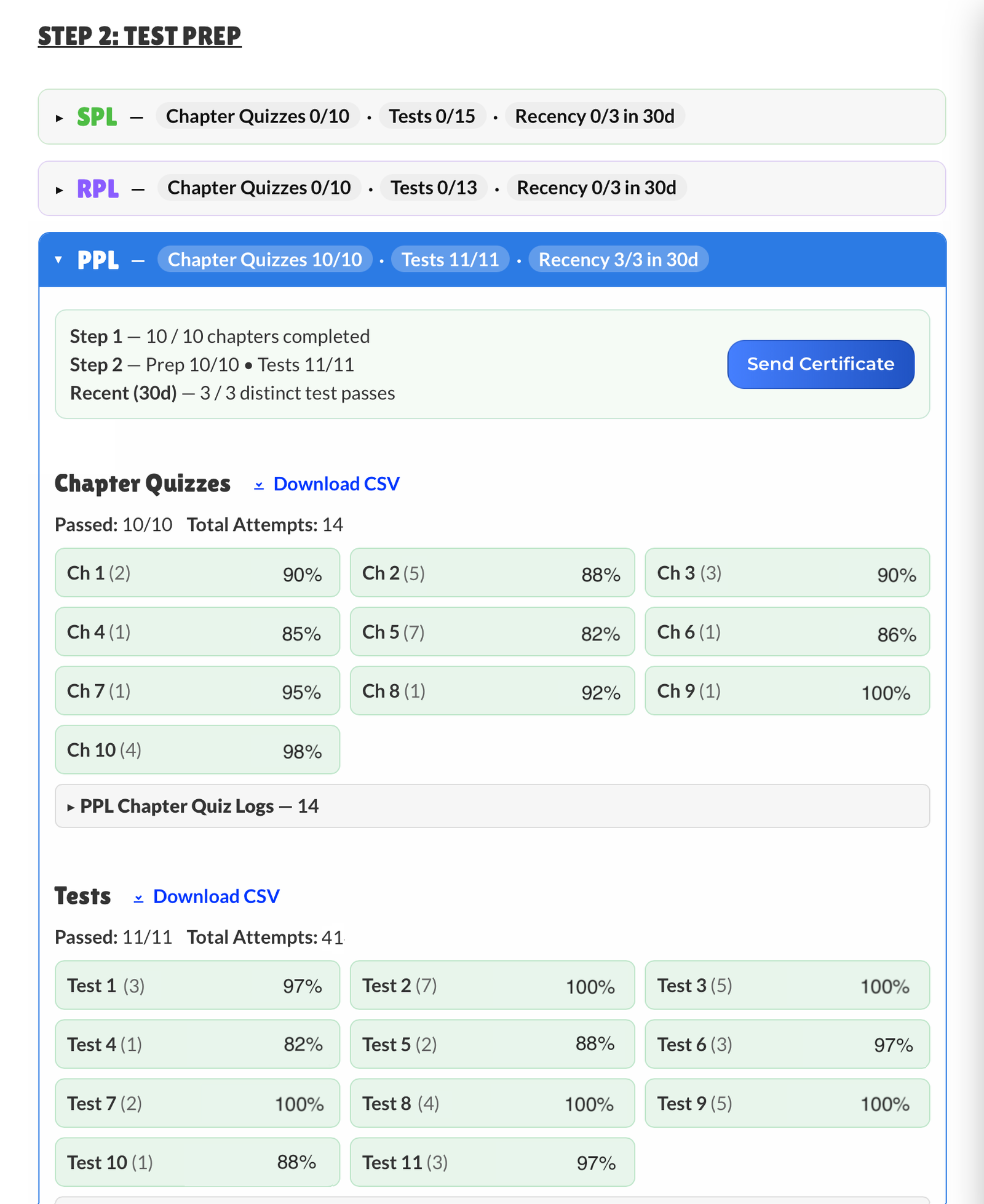
Follow each student’s course activity, lesson completion status and quiz results through the instructor or school console. This gives instructors and schools a clearer view of where students stand and what may still need attention.

Communication

Keep training communication connected with student chat, shared notes and staff communication tools. Instructors and schools can support questions, follow-up and coordination without separating everything across different channels.

Training Organization

Use course materials to prepare and support live sessions. Follow a structured path, connect student self-study to real application and soon use the Syllabus Creator tool to organize training with templates, activity ideas and scenarios.

INSTRUCTOR & SCHOOL CONSOLE

Track Student Progress From One Console

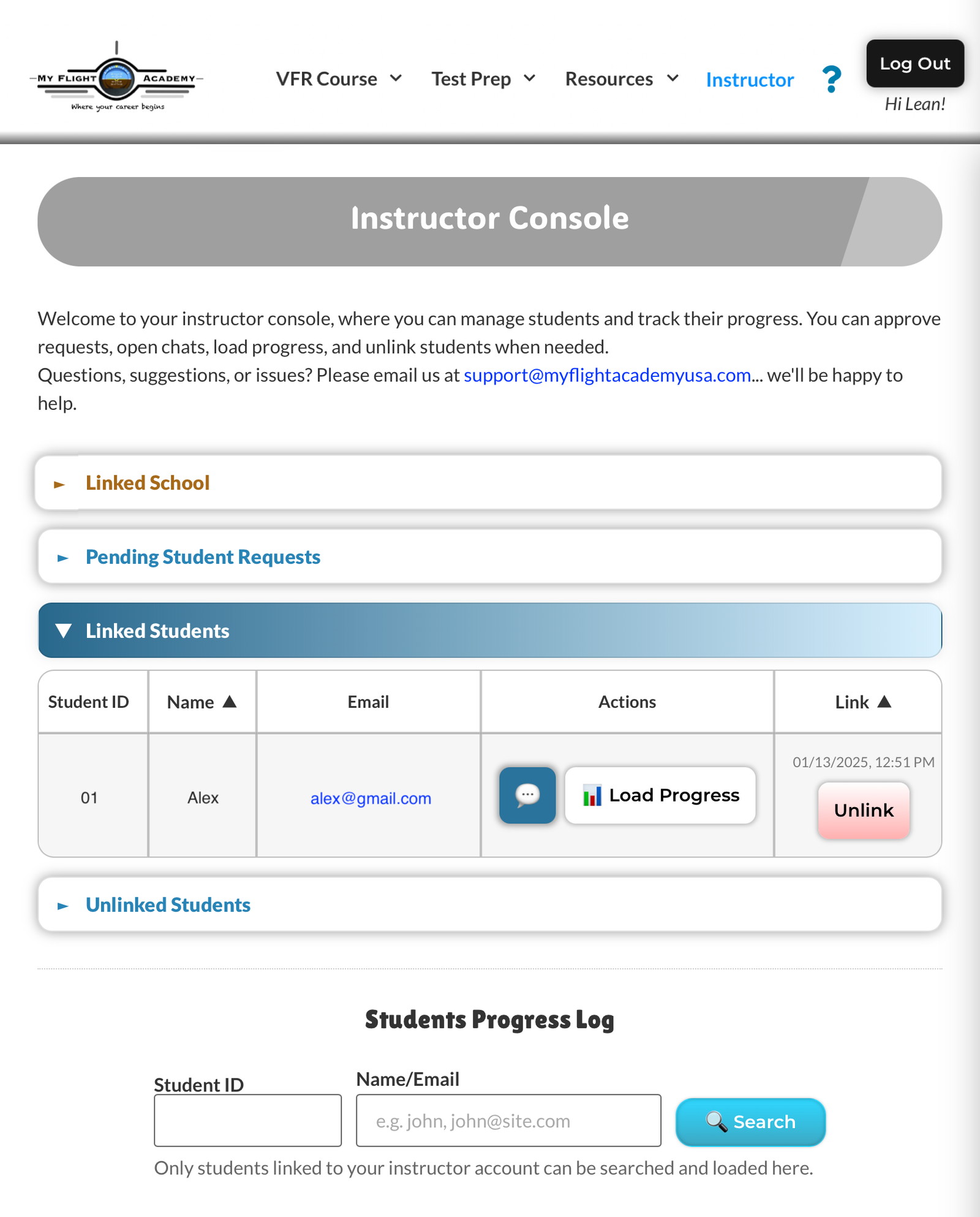
Following student progress is essential to helping students reach their goals and providing support when it matters most. With the Instructor Console and School Console, it’s easy to monitor training activity, stay connected and remain proactive.

Course Activity

Track readings, course videos and resources with clear date-and-time stamps. See which lessons have been completed, what still needs attention and where a student may be falling behind. Schools can also see each student’s connected instructor.

Quiz Results

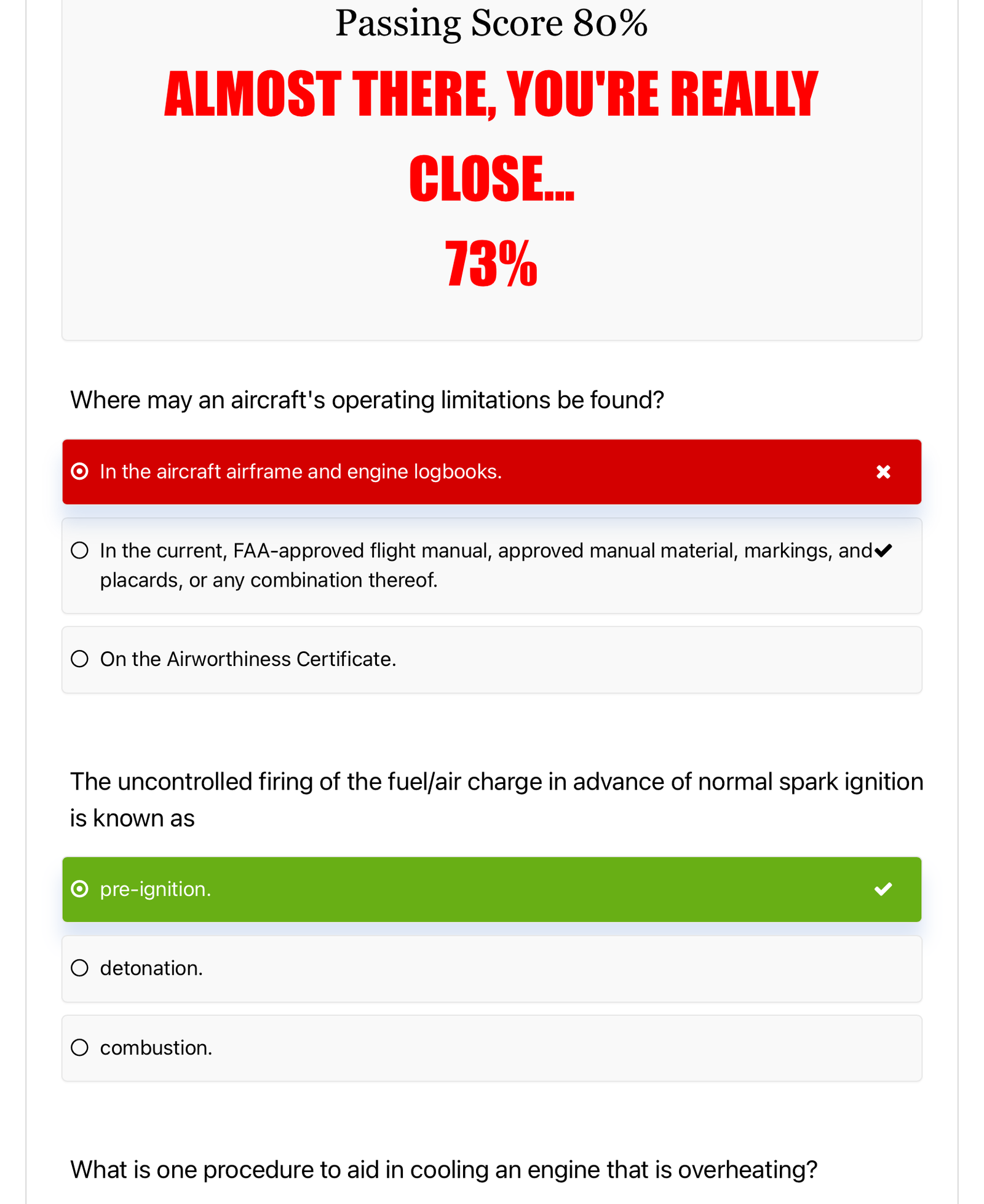
Review quiz history to identify weak areas quickly. The quiz log summarizes score, attempts, time spent and pass/fail status. View Results shows which questions need more work.

Progress Reports

Download a clean PDF of student progress for organized training records. Activity logs are also exportable in CSV format.

STUDENT & STAFF CHAT

Communication Is Key to Efficient Training

Clear communication helps students feel supported, informed and confident throughout their training. When questions, concerns or misunderstandings arise, instructors and schools need a simple way to respond quickly and keep follow-up connected to the learning process.

With built-in student and staff chat tools, communication stays organized in one place, making it easier to support students, coordinate with the team and maintain better training transparency.

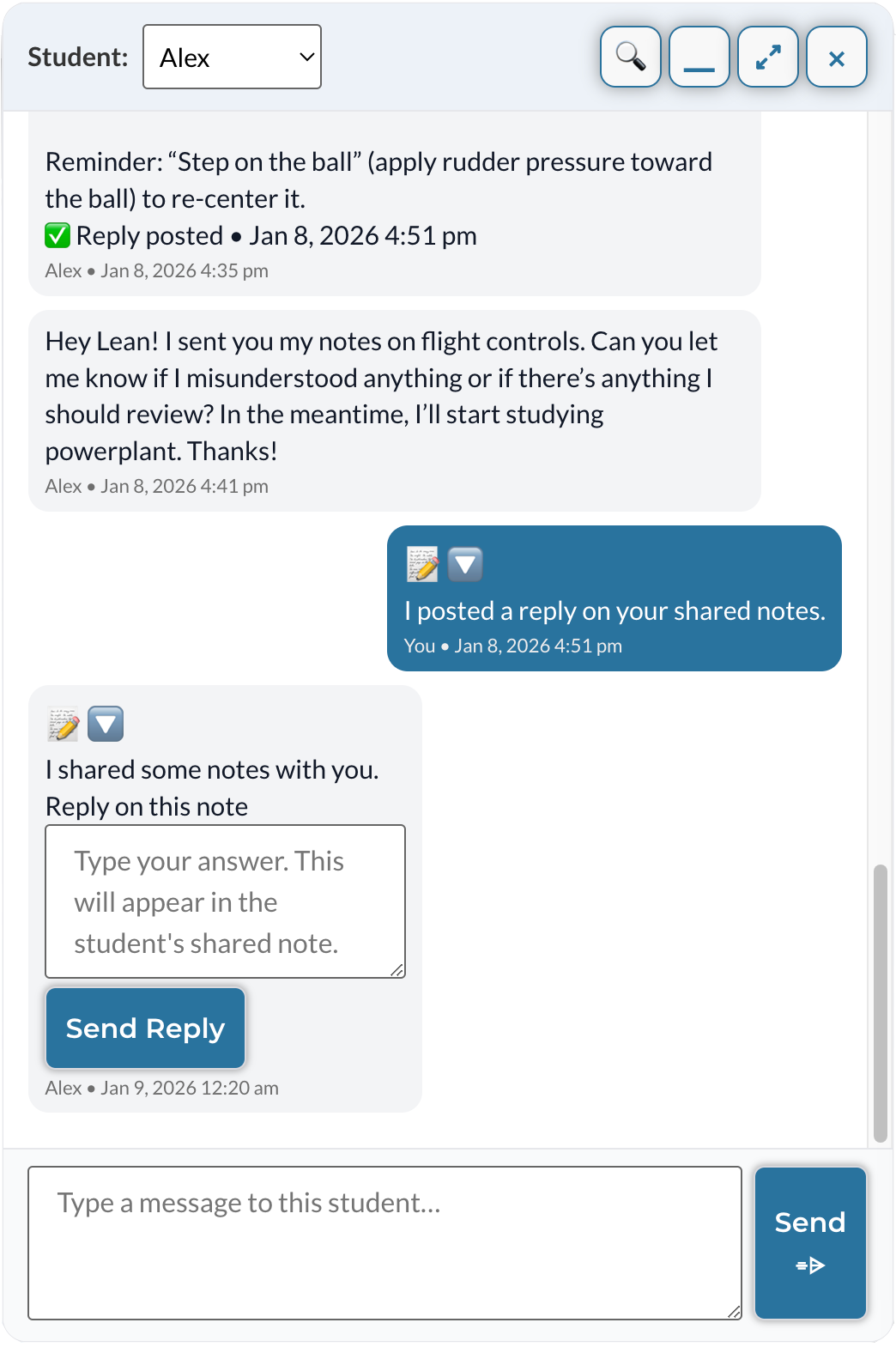
My Flight Academy instructor chat for communicating with students and improving training efficiency

Student Chat

Communicate directly with linked students through a dedicated built-in chat. Instructors and schools can answer questions, follow up between lessons and keep student communication connected to the training environment.

Shared Notes

Students can share notes with their linked instructors, making it easier to review questions, clarify misunderstandings and guide follow-up. Instructors can reply directly from their chat, instantly posting the response in the student’s console.

Staff Chat

Schools can message instructors one-on-one or start group conversations with multiple instructors. Instructors within the same school can also chat individually or create group chats to collaborate and communicate efficiently.

Secure & Private

Only authorized users can view messages.

Device & Email Notifications

Stay aware of new messages and replies.

Multi-Device Access

Use chat on desktop, tablet or phone.

Coming Soon

This is where the training platform is going next.

SYLLABUS CREATOR TOOL

Structure Training Around Preparation and Application

The upcoming Syllabus Creator is being designed to help instructors and schools organize training more intentionally, assign study preparation and connect student self-study to live instruction.

Star With Templates

Use prebuilt syllabus templates as-is or as a starting point. Customize the sequence, lessons and stage checks, with access to a built-in bank of activities and ACS/PTS items.

Build From Scratch

Create your own syllabus structure and adapt the training flow to your instructional style. You can still use the built-in bank to help ensure ACS/PTS items are covered.

Connected Training

Students can view their syllabus directly from their console, helping them see what has been completed, understand what happened during training and know what comes next.

A Different Approach to Training

Some templates will be built around structured training models, including flipped-classroom preparation and two-phase training sequencing.

These options help connect ground knowledge, live instruction and flight training more intentionally, while still allowing instructors and schools to adapt the syllabus to their own teaching style.

The built-in syllabus bank offers activity options and ideas to help integrate alternative teaching methods, improve training efficiency and support better retention.

Flipped-Classroom Approach

Students self-study before class, then live instruction is used for application through activities such as discussion, scenarios, role play, etc…

Two-Phase Training Sequencing

The first phase focuses on ground training with targeted flight exposure. The second phase then shifts toward flight training while continuing to reinforce ground knowledge.

Ready to Bring Connected Tools Into Your Training?

Instructor access is available after VFR Course enrollment and certificate review. Schools can contact us directly to set up team access.

Already a member or have questions? Contact us and we’ll help with your access request.

Interested in testing the tools and sharing feedback? Apply for the feedback program and receive free access.

Send a Message

Feel free to contact us if you need assistance, have a question or need help with your account.

ℹ️ Before sending a message, please visit our FAQ. If you still need help, use the form below or email us at contact@myflightacademyusa.com 

đź”’ Your information is safe with us. We respect your privacy.

Feedback Program Application

Thanks for your interest in our feedback program!

This application only takes a few minutes to complete. We ask for a few background details so we can evaluate feedback accurately and better understand how different students, pilots, instructors and schools experience the training platform.

After you submit the form, we will review your application and contact you by email. If selected, you will receive your login credentials and access instructions.

Start with the information we’ll use to review your application and create your account if selected.

Requesting instructor or school access?

If you are an instructor, provide the email address you would like to use for your instructor profile and upload your AGI or CFI certificate so we can review your request for instructor-level access.
This email may be different from your login email. It will be used for student connection requests, chat messages and instructor notifications.

If you are applying as a flight school, provide the email address you would like to use for your school profile and tell us how many CFIs and students will be participating.

Pilot Profile

Tell us about your aviation background, whether you are a student, pilot, instructor or school representative.

Certificates & Ratings

Share what you are working on and what you already hold.

Training Experience

Help us understand your current or previous flight training.

For Instructors & Schools Only

Complete this section only if you are requesting instructor or school access.

This section helps us understand what attracted you to the program and which features you are most interested in exploring.

Feedback Program Expectations

As a feedback program participant, you will be asked to explore the course and share honest feedback about the learning experience. We may request feedback after you have had time to become familiar with the course and platform. You may also be asked to complete a feedback survey after finishing the course or after a longer period of use.

Feedback may include comments about lesson clarity, platform usability, quizzes, study materials, progress tracking, notes, instructor/school tools and anything that felt helpful, confusing or missing. If you notice a technical issue or bug, please report it as soon as reasonably possible.

Feedback does not need to be positive. We are looking for honest observations that can help us evaluate the strengths and weaknesses of the learning experience and improve the platform, the course and future programs.

đź”’ Your information is safe with us. We respect your privacy.

Log in to manage your notification settings.

Log in to manage your chat email reminders.

Have a Question?
Test prep illustration
A man successfully passed his FAA written exam

Get Ready...

... For...

... The Exam!

My Flight Academy logo
Privacy Overview

This website uses cookies so that we can provide you with the best user experience possible. Cookie information is stored in your browser and performs functions such as recognising you when you return to our website and helping our team to understand which sections of the website you find most interesting and useful.